
k8s-sentinel: CronJob Hygiene for Single-Admin Homelab Clusters
Why CronJob Failures Haunt Homelab Clusters
In the world of self-hosted Kubernetes, CronJobs are a powerful tool for automating batch tasks like backups, syncs, and CI cleanup. However, when these jobs fail, they can be easy to miss, especially in a single-admin homelab environment. Unlike cloud-based clusters, where monitoring and alerting are often handled by dedicated teams, homelab operators must rely on their own vigilance and automation to ensure that critical tasks succeed.
Consider a scenario where a backup job fails due to a misconfigured volume mount. The job might not immediately alert you, and the failure might not be obvious until storage space is critically low. By the time you notice, the job might have run multiple times, filling up your disk with failed backup attempts. This is where the kube_job_failed metric can be misleading. It might show that a job failed, but it doesn't provide context or logs to help you understand why.
In a homelab setting, you might find yourself constantly checking logs and metrics, only to find that the issue is not immediately apparent. This can lead to alert fatigue, where you become desensitized to repeated alerts and miss critical issues. The kube_job_failed metric can linger in your monitoring dashboard, creating a false sense of security. It's only when you manually inspect the job's logs that you realize the problem.
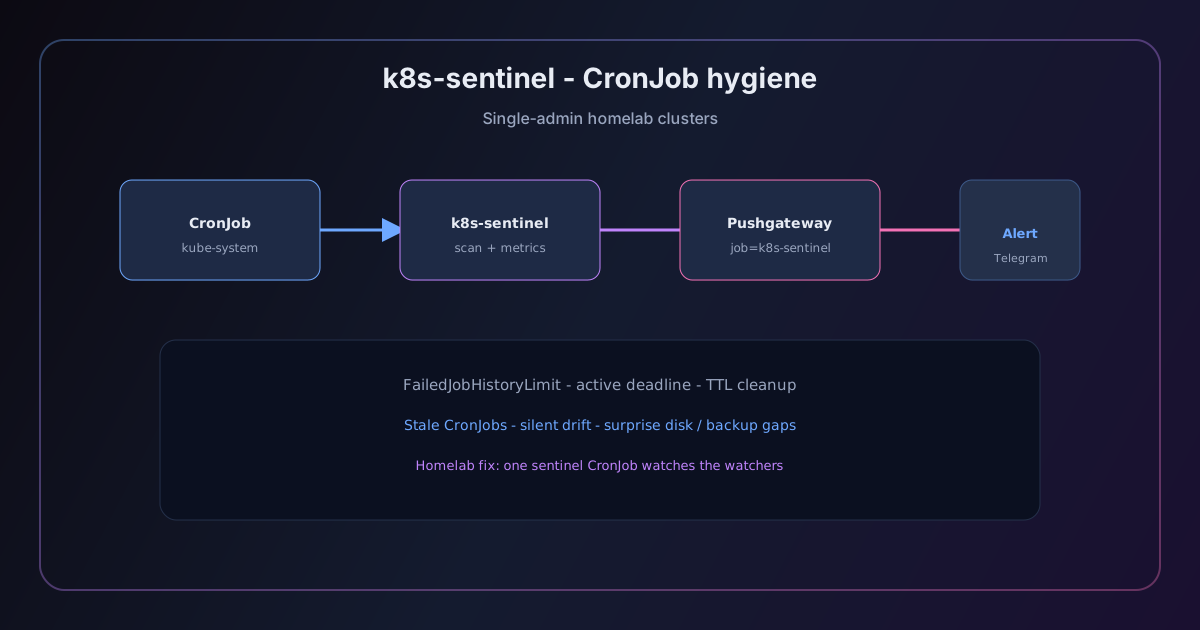
To address this, we need a more robust system for monitoring and alerting on CronJob failures. This is where k8s-sentinel comes in, specifically its cronjobs module. This module scans for failed batch jobs, attaches relevant log tails, and provides context about the failure. By automating this process, we can reduce the risk of missed failures and ensure that our homelab remains healthy.
Prometheus vs Operator Reality
kube_job_failed and CronJobFailed
Prometheus is a powerful tool for monitoring Kubernetes clusters, and it provides several metrics that can help us track the health of our CronJobs. Two of the most relevant metrics are kube_job_failed and CronJobFailed.
The kube_job_failed metric is a generic indicator that a job has failed. It can be useful for identifying failures, but it lacks context. For example, if a backup job fails, kube_job_failed will notify you, but it won't tell you why the job failed or provide any logs to help you diagnose the issue.
On the other hand, the CronJobFailed metric is more specific to CronJobs. It provides a timestamp for the last successful run and the last failed run, which can be useful for identifying recent failures. However, CronJobFailed is only emitted if the CronJob has failed at least once. If the job has never failed, this metric will not be emitted, making it less useful for proactive monitoring.
Last-Success Timestamps
Another useful metric is the last-success timestamp. This can be found in the status.lastScheduleTime field of a CronJob's status. It provides a clear indication of when the job was last successfully executed. However, this metric alone is not sufficient for monitoring CronJob failures. It only tells you when the job was last successful, but it doesn't provide any information about why the job failed or what logs are available to help you diagnose the issue.
Why Metrics Alone Aren't Enough
While metrics are a valuable tool for monitoring CronJob failures, they are not enough on their own. Metrics provide a high-level view of the health of your CronJobs, but they lack the context and detail needed to diagnose and resolve issues. For example, a kube_job_failed alert might indicate that a job has failed, but it won't tell you what went wrong or where to find the relevant logs.
To address this, we need to combine metrics with logs and context. This is where k8s-sentinel comes in. The cronjobs module scans for failed batch jobs, attaches relevant log tails, and provides context about the failure. By automating this process, we can reduce the risk of missed failures and ensure that our homelab remains healthy.
The cronjobs Check Module
Cluster-Wide Job Scan
The cronjobs check module in k8s-sentinel is designed to scan for failed batch jobs cluster-wide. It uses the kube_job_status metric to identify jobs that have failed and then attaches relevant log tails to provide context about the failure. This module is particularly useful in a homelab setting, where you might have multiple CronJobs running across different namespaces and applications.
To use the cronjobs module, you need to configure it in your k8s-sentinel configuration. Here's an example configuration:
cronjobs:
  enabled: true
  log_tail: 100
  max_age_hours: 48
In this configuration, enabled is set to true to enable the module, log_tail is set to 100 to attach the last 100 lines of logs to the alert, and max_age_hours is set to 48 to ignore stale failures older than 48 hours.
Log Tail (SENTINEL_CRONJOB_LOG_TAIL)
The log_tail parameter in the cronjobs module is used to specify the number of lines of logs to attach to the alert. This is particularly useful for identifying the root cause of a failure. For example, if a backup job fails due to a misconfigured volume mount, the relevant log lines might be near the end of the log file. By attaching the last 100 lines of logs to the alert, you can quickly identify the issue and take corrective action.
Owner CronJob Name
The cronjobs module also provides the owner CronJob name in the alert. This is useful for identifying which CronJob caused the failure. For example, if you have multiple CronJobs running in the same namespace, the owner CronJob name can help you quickly identify which job failed and take corrective action.
Known-Pattern Hints
The cronjobs module also provides known-pattern hints from real incidents. These hints are useful for identifying common failure patterns and providing context about the failure. For example, if a job fails due to a mapfile: not found error, the module might provide a hint that the file is missing from the job's volume. This can help you quickly identify the issue and take corrective action.
Age Windows and Safe Cleanup
SENTINEL_CRONJOB_MAX_AGE_HOURS
One of the key features of the cronjobs module is the ability to ignore stale failures. This is controlled by the SENTINEL_CRONJOB_MAX_AGE_HOURS parameter, which specifies the maximum age of a failure in hours. If a failure is older than this age, it will be ignored and not included in the alert.
For example, if you set SENTINEL_CRONJOB_MAX_AGE_HOURS to 48, the module will ignore failures that are older than 48 hours. This is useful for reducing alert fatigue and ensuring that you only receive alerts for recent failures.
Ignore Stale Failures
By ignoring stale failures, you can reduce the number of alerts that you receive and focus on recent failures. This is particularly useful in a homelab setting, where you might have multiple CronJobs running across different namespaces and applications. By ignoring stale failures, you can ensure that you only receive alerts for recent failures and take corrective action.
Auto-Fix Deletes Failed Job Objects
The cronjobs module also provides the ability to auto-fix failed job objects. This is controlled by the auto_fix parameter, which is set to true by default. When auto_fix is set to true, the module will automatically delete failed job objects (not pods) after a certain period of time.
For example, if you set auto_fix to true and SENTINEL_CRONJOB_MAX_AGE_HOURS to 48, the module will automatically delete failed job objects that are older than 48 hours. This is useful for reducing the number of failed job objects in your cluster and ensuring that your cluster remains healthy.
Skip k8s-sentinel-* Test Jobs
The cronjobs module also provides the ability to skip k8s-sentinel-* test jobs. This is controlled by the skip_test_jobs parameter, which is set to true by default. When skip_test_jobs is set to true, the module will skip any jobs that are named k8s-sentinel-*.
For example, if you have a test job named k8s-sentinel-backup-test, the module will skip this job and not include it in the alert. This is useful for reducing the number of false positives and ensuring that you only receive alerts for real failures.
Alert Deduplication
SentinelModuleWarning{module!="cronjobs"}
To reduce alert fatigue, the cronjobs module provides the ability to deduplicate alerts. This is controlled by the SentinelModuleWarning metric, which is emitted by the module when a failure is detected. The SentinelModuleWarning metric is emitted with the module label set to the name of the module that detected the failure.
For example, if the cronjobs module detects a failure, it will emit a SentinelModuleWarning metric with the module label set to cronjobs. This metric can be used to deduplicate alerts from other modules, ensuring that you only receive one alert for each failure.
Telegram + CronJobFailed
To further reduce alert fatigue, the cronjobs module provides the ability to route alerts to Telegram. This is controlled by the telegram parameter, which is set to true by default. When telegram is set to true, the module will route alerts to Telegram.
For example, if the cronjobs module detects a failure and emits a SentinelModuleWarning metric, it will also route the alert to Telegram. This is useful for ensuring that you receive alerts on your mobile device and can take corrective action quickly.
Pushgateway sentinel_check_status and Stale-Metrics Alert
To further reduce alert fatigue, the cronjobs module provides the ability to emit a sentinel_check_status metric to the Pushgateway. This metric can be used to trigger a stale-metrics alert if the module has not detected any failures in a certain period of time.
For example, if the cronjobs module has not detected any failures in the last 24 hours, it will emit a sentinel_check_status metric with the status label set to ok. If the module has detected a failure, it will emit a sentinel_check_status metric with the status label set to failure. This metric can be used to trigger a stale-metrics alert, ensuring that you receive alerts when the module is not functioning as expected.
Homelab Tuning Checklist
Schedule
The cronjobs module can be configured with a schedule to run at regular intervals. This is controlled by the schedule parameter, which is set to */30 * * * * by default. This schedule runs the module every 30 minutes, which is a good balance between frequency and resource usage.
For example, if you set schedule to */15 * * * *, the module will run every 15 minutes. This is useful for ensuring that you receive alerts for recent failures and take corrective action quickly.
failedJobsHistoryLimit
The cronjobs module can be configured with a failedJobsHistoryLimit parameter to control the number of failed jobs that are retained. This is controlled by the failedJobsHistoryLimit parameter, which is set to 10 by default. This parameter controls the number of failed jobs that are retained in the module's state.
For example, if you set failedJobsHistoryLimit to 5, the module will retain the last 5 failed jobs in its state. This is useful for ensuring that you have enough context to diagnose failures and take corrective action.
Namespace CSV Filter
The cronjobs module can be configured with a namespace CSV filter to control which namespaces are monitored. This is controlled by the namespace parameter, which is set to kube-system by default. This parameter controls which namespaces are monitored by the module.
For example, if you set namespace to kube-system,monitoring, the module will monitor the kube-system and monitoring namespaces. This is useful for ensuring that you only monitor the namespaces that are relevant to your cluster.
Module List in Helm Values
The cronjobs module can be configured with a module list in the Helm values to control which modules are included in the check. This is controlled by the module_list parameter, which is set to cronjobs by default. This parameter controls which modules are included in the check.
For example, if you set module_list to cronjobs,deployments, the module will include the cronjobs and deployments modules in the check. This is useful for ensuring that you only include the modules that are relevant to your cluster.
Relation to Node-Level Disk Maintenance Cron
The cronjobs module can be configured with a relation to the node-level disk maintenance cron to ensure that disk maintenance tasks are not affected by failed CronJobs. This is controlled by the disk_maintenance_cron parameter, which is set to false by default. This parameter controls whether the module is related to the node-level disk maintenance cron.
For example, if you set disk_maintenance_cron to true, the module will be related to the node-level disk maintenance cron. This is useful for ensuring that disk maintenance tasks are not affected by failed CronJobs and that your cluster remains healthy.
Runbook Pointer
Copy-Paste Ops Live in kb
To ensure that you can quickly take corrective action when a CronJob fails, we recommend that you copy-paste the runbook live in your knowledge base (kb). The kb_slug for this runbook is k8s-sentinel-cronjob-hygiene. This runbook provides step-by-step instructions for troubleshooting CronJob failures and taking corrective action.
For example, if a backup job fails due to a misconfigured volume mount, the runbook might provide the following steps:
- Check the
kube_job_statusmetric to identify the failed job. - Attach the last 100 lines of logs to the alert to identify the root cause of the failure.
- Identify the owner CronJob name in the alert to determine which CronJob caused the failure.
- Take corrective action to resolve the issue, such as updating the volume mount configuration.
- Monitor the job to ensure that it runs successfully.
By following these steps, you can quickly take corrective action when a CronJob fails and ensure that your homelab remains healthy.
Conclusion
In this article, we've discussed the challenges of monitoring CronJob failures in a homelab setting and how the cronjobs module in k8s-sentinel can help address these challenges. By combining metrics with logs and context, the cronjobs module can help you quickly identify and resolve CronJob failures, reducing the risk of missed failures and ensuring that your homelab remains healthy.
To learn more about k8s-sentinel and the cronjobs module, we recommend that you check out the runbook live in your knowledge base (kb). This runbook provides step-by-step instructions for troubleshooting CronJob failures and taking corrective action.
k8s-sentinel: CronJob 卫生管理為單一管理員家用集群
为什么 CronJob 失敗困擾家用 Kubernetes 集群
在自托管 Kubernetes 的世界中,CronJobs 是一個強大的工具,用於自動化批量任務,如備份、同步和 CI 清理。然而,當這些工作失敗時,它們很容易被忽略,特別是在單一管理員的家用 Kubernetes 環境中。與雲端基於 Kubernetes 的集群不同,雲端基於 Kubernetes 的集群的監控和警報通常由專門的團隊處理,家用 Kubernetes 操作員必須依賴自己的警覺性和自動化來確保關鍵任務的成功。
考慮一個備份工作失敗的情況,由於卷掛載配置錯誤。這個工作可能不會立刻讓你警覺,而失敗可能直到存儲空間嚴重不足才顯而易見。等你注意到時,這個工作可能已經多次運行,把你的磁碟機填滿了失敗的備份嘗試。這正是 kube_job_failed 指標可能產生誤導的地方。它可能顯示工作失敗,但並沒有提供上下文或日誌來幫助你理解原因。
在家用 Kubernetes 環境中,你可能不斷檢查日誌和指標,只發現問題並不明顯。這可能會導致警報疲勞,讓你對重複的警報變得麻木,而忽略關鍵問題。kube_job_failed 指標可能在你的監控板上停留,創造一種虛假的安全感。只有在你手動檢查工作的日誌時,你才會意識到問題。
為了解決這個問題,我們需要一個更為堅固的系統來監控和警報 CronJob 失敗。這就是 k8s-sentinel 的作用,特別是它的 cronjobs 模組。這個模組會掃描失敗的批量工作,附加相關的日誌尾部,並提供失敗的上下文。通過自動化這個過程,我們可以降低失敗被忽略的風險,確保我們的家用 Kubernetes 環境保持健康。
Prometheus vs Operator現実
kube_job_failed 和 CronJobFailed
Prometheus 是監控 Kubernetes 集群的一個強大工具,並提供多個指標來幫助我們追蹤 CronJobs 的健康狀態。兩個最相關的指標是 kube_job_failed 和 CronJobFailed。
kube_job_failed 指標是一種泛用的指示器,表示有工作失敗。它對於識別失敗很有用,但缺乏上下文。例如,如果備份工作失敗,kube_job_failed 會通知您,但它不會告訴您工作失敗的原因,也無法提供任何日誌來幫助您診斷問題。
另一方面,CronJobFailed 指標專門針對 CronJobs。它提供了最後一次成功運行和最後一次失敗運行的時間戳,對於識別最近的失敗很有用。然而,CronJobFailed 只有在 CronJobs 至少失敗一次時才會發出。如果工作從未失敗,這個指標不會發出,使得它對於積極監控不太有用。
最後成功時間戳
另一個有用的指標是最後成功時間戳。這可以在 CronJob 狀態的 status.lastScheduleTime 字段中找到。它提供了工作最後一次成功執行的明確指示。然而,這個指標本身對於監控 CronJob 失敗並不足夠。它只告訴您工作最後一次成功執行的時間,但沒有提供工作失敗的原因或可用的日誌來幫助您診斷問題。
為什麼單靠指標不夠
雖然指標對於監控 CronJob 失敗很有價值,但單靠指標是不夠的。指標提供了 CronJobs 健康狀況的高層次視圖,但缺乏診斷和解決問題所需的上下文和細節。例如,一個 kube_job_failed 警報可能會指出工作失敗,但它不會告訴您發生了什麼問題,或者您應該在哪裡找到相關的日誌。
要解決這個問題,我們需要將指標與日誌和上下文結合起來。這就是 k8s-sentinel 的作用。cronjobs 模組會掃描失敗的工作,附加相關的日誌尾部,並提供失敗的上下文。通過自動化這個過程,我們可以減少失敗被忽略的風險,並確保我們的家用實驗室保持健康。
The cronjobs Check Module
全集群工作掃描
k8s-sentinel 中的 cronjobs 檢查模組設計用來掃描整個集群中失敗的工作。它使用 kube_job_status 測量值來識別失敗的工作,然後附加相關的日誌尾部以提供失敗的上下文。這個模組在家庭實驗室環境中特別有用,在這種環境中,你可能會在不同的命名空間和應用程序中運行多個 CronJobs。
要使用 cronjobs 模組,你需要在 k8s-sentinel 的配置中進行配置。以下是一個範例配置:
cronjobs:
  enabled: true
  log_tail: 100
  max_age_hours: 48
在這個配置中,enabled 設置為 true 以啟用模組,log_tail 設置為 100 以附加最後 100 行日誌到警報,而 max_age_hours 設置為 48 以忽略 48 小時以上的陳舊失敗。
日誌尾部 (SENTINEL_CRONJOB_LOG_TAIL)
cronjobs 模組中的 log_tail 參數用於指定附加到警報的日誌行數。這對於識別失敗的根本原因非常有用。例如,如果備份工作因卷掛載配置錯誤而失敗,相關的日誌行可能位於日誌文件的末尾。通過附加最後 100 行日誌到警報,你可以快速識別問題並採取糾正措施。
所有者 CronJobs 名稱
cronjobs 模組還在警報中提供所有者 CronJobs 名稱。這對於識別哪個 CronJobs 导致失敗非常有用。例如,如果你在同一命名空間中運行多個 CronJobs,所有者 CronJobs 名稱可以幫助你快速識別哪個工作失敗並採取糾正措施。
已知模式提示
cronjobs 模組還提供來自實際事件的已知模式提示。這些提示對於識別常見的失敗模式並提供失敗的上下文非常有用。例如,如果工作因 mapfile: not found 錯誤而失敗,模組可能會提供一個提示,指出該文件從工作卷中缺失。這可以幫助你快速識別問題並採取糾正措施。
年齡與安全清理
SENTINEL_CRONJOB_MAX_AGE_HOURS
cronjobs 模組的一個重要功能是能夠忽略陳舊的失敗。這是由 SENTINEL_CRONJOB_MAX_AGE_HOURS 參數控制的,該參數指定了失敗的最大年齡(單位為小時)。如果失敗的年齡超過這個年齡,它將被忽略,不會包含在警報中。
例如,如果你將 SENTINEL_CRONJOB_MAX_AGE_HOURS 設置為 48,模組將忽略年齡超過 48 小時的失敗。這對於減少警報疲勞和確保你只收到最近失敗的警報非常有用。
忽略陳舊失敗
通過忽略陳舊的失敗,你可以減少收到的警報數量,並專注於最近的失敗。這在家庭實驗室(homelab)環境中尤其有用,因為你可能在不同的命名空間和應用程式中運行多個 CronJobs。通過忽略陳舊的失敗,你可以確保只收到最近失敗的警報,並採取糾正措施。
自動修復失敗的作業物件
cronjobs 模組還提供了一種自動修復失敗的作業物件的功能。這是由 auto_fix 參數控制的,默認設置為 true。當 auto_fix 設置為 true 時,模組會在一定時間後自動刪除失敗的作業物件(不是 pod)。
例如,如果你將 auto_fix 設置為 true,並將 SENTINEL_CRONJOB_MAX_AGE_HOURS 設置為 48,模組將自動刪除年齡超過 48 小時的失敗作業物件。這對於減少集群中失敗的作業物件數量並確保集群保持健康非常有用。
跳過 k8s-sentinel-* 測試作業
cronjobs 模組還提供了一種跳過 k8s-sentinel-* 測試作業的功能。這是由 skip_test_jobs 參數控制的,默認設置為 true。當 skip_test_jobs 設置為 true 時,模組會跳過任何名為 k8s-sentinel-* 的作業。
例如,如果你有一個名為 k8s-sentinel-backup-test 的測試作業,模組將跳過這個作業,不會將其包含在警報中。這對於減少假警報數量並確保你只收到真正的失敗警報非常有用。
警告去重
SentinelModuleWarning{module!="cronjobs"}
為了減少警報疲勞,cronjobs 模組提供了警告去重的能力。這是由 SentinelModuleWarning 測量值控制的,當模組檢測到失敗時,模組會發出這個測量值。SentinelModuleWarning 測量值會用 module 標籤設置為檢測失敗的模組名稱。
例如,如果 cronjobs 模組檢測到失敗,它會發出一個 SentinelModuleWarning 測量值,並設置 module 標籤為 cronjobs。這個測量值可以被用來去重其他模組的警報,確保你只會收到每個失敗的一個警報。
Telegram + CronJobFailed
為了進一步減少警報疲勞,cronjobs 模組提供了將警報路由到 Telegram 的能力。這是由 telegram 參數控制的,預設值為 true。當 telegram 設置為 true 時,模組會將警報路由到 Telegram。
例如,如果 cronjobs 模組檢測到失敗並發出一個 SentinelModuleWarning 測量值,它也會將警報路由到 Telegram。這對於確保你可以在手機上收到警報並迅速採取行動是有用的。
Pushgateway sentinel_check_status 和 僵屍警報
為了進一步減少警報疲勞,cronjobs 模組提供了將 sentinel_check_status 測量值發送到 Pushgateway 的能力。這個測量值可以用來觸發僵屍警報,如果模組在一定時間內沒有檢測到任何失敗。
例如,如果 cronjobs 模組在過去 24 小時內沒有檢測到任何失敗,它會發出一個 sentinel_check_status 測量值,並設置 status 標籤為 ok。如果模組檢測到失敗,它會發出一個 sentinel_check_status 測量值,並設置 status 標籤為 failure。這個測量值可以被用來觸發僵屍警報,確保你可以在模組未按預期運行時收到警報。
Homelab 調整檢查清單
項目表排程
cronjobs 模組可以配置排程,以定期執行。這是由 schedule 參數控制的,預設值為 */30 * * * *。這個排程每 30 分鐘執行一次模組,這是一種頻率和資源使用的良好平衡。
例如,如果您將 schedule 設為 */15 * * * *,模組將每 15 分鐘執行一次。這對於確保您能夠及時收到最近失敗的警報並採取糾正措施非常有用。
failedJobsHistoryLimit
cronjobs 模組可以配置 failedJobsHistoryLimit 參數來控制保留的失敗工作數量。這是由 failedJobsHistoryLimit 參數控制的,預設值為 10。這個參數控制模組狀態中保留的失敗工作數量。
例如,如果您將 failedJobsHistoryLimit 設為 5,模組將保留其狀態中的最後 5 個失敗工作。這對於確保您能夠足夠的上下文來診斷失敗並採取糾正措施非常有用。
命名空間 CSV 篩選器
cronjobs 模組可以配置命名空間 CSV 篩選器來控制哪些命名空間會被監控。這是由 namespace 參數控制的,預設值為 kube-system。這個參數控制模組監控哪些命名空間。
例如,如果您將 namespace 設為 kube-system,monitoring,模組將監控 kube-system 和 monitoring 命名空間。這對於確保您只監控對您的集群相關的命名空間非常有用。
Helm 值中的模組列表
cronjobs 模組可以配置 Helm 值中的模組列表來控制哪些模組包含在檢查中。這是由 module_list 參數控制的,預設值為 cronjobs。這個參數控制檢查中包含哪些模組。
例如,如果您將 module_list 設為 cronjobs,deployments,模組將包含 cronjobs 和 deployments 模組在檢查中。這對於確保您只包含對您的集群相關的模組非常有用。
與節點級磁碟維護 Cron 的關係
cronjobs 模組可以配置與節點級磁碟維護 Cron 的關係,以確保磁碟維護任務不會受到失敗 CronJobs 的影響。這是由 disk_maintenance_cron 參數控制的,預設值為 false。這個參數控制模組是否與節點級磁碟維護 Cron 有關聯。
例如,如果您將 disk_maintenance_cron 設為 true,模組將與節點級磁碟維護 Cron 有關聯。這對於確保磁碟維護任務不會受到失敗 CronJobs 的影響,並且您的集群保持健康非常有用。
Runbook 指引
直接複製粘貼操作手冊至知識庫
為了確保在 CronJob 失敗時能夠快速採取補救措施,我們建議您將操作手冊直接複製粘貼至您的知識庫(kb)中。此操作手冊的 kb_slug 為 k8s-sentinel-cronjob-hygiene。此操作手冊提供了詳細步驟來トラブル排查 CronJob 失敗並採取補救措施。
例如,如果備份工作因卷綁定配置錯誤而失敗,操作手冊可能會提供以下步驟:
- 檢查
kube_job_status指標以識別失敗的工作。 - 將最後 100 行日誌附加到警報中,以識別失敗的根本原因。
- 在警報中識別失敗的 CronJob 名稱,以確定是哪個 CronJob 引起的失敗。
- 採取補救措施來解決問題,例如更新卷綁定配置。
- 監控工作以確保其成功運行。
遵循這些步驟,您可以在 CronJob 失敗時快速採取補救措施,並確保您的家庭實驗室保持健康狀態。
結論
在本文中,我們討論了在家庭實驗室環境中監控 CronJob 失敗所面臨的挑戰,以及 k8s-sentinel 中的 cronjobs 模組如何幫助應對這些挑戰。透過結合度量資料與日誌和上下文,cronjobs 模組可幫助您快速識別並解決 CronJob 失敗,降低遺漏失敗的風險,並確保您的家庭實驗室保持健康狀態。
如需了解更多關於 k8s-sentinel 和 cronjobs 模組的資訊,我們建議您參閱知識庫 (kb) 中的 手冊。此手冊提供了逐步指示,用於診斷 CronJob 失敗並採取補救措施。
Related internal runbook: k8s-sentinel-cronjob-hygiene (VPN) 相關內部 runbook:k8s-sentinel-cronjob-hygiene(VPN)